

Clone Experiment: Food Ordering web & mobile app using a single codebase
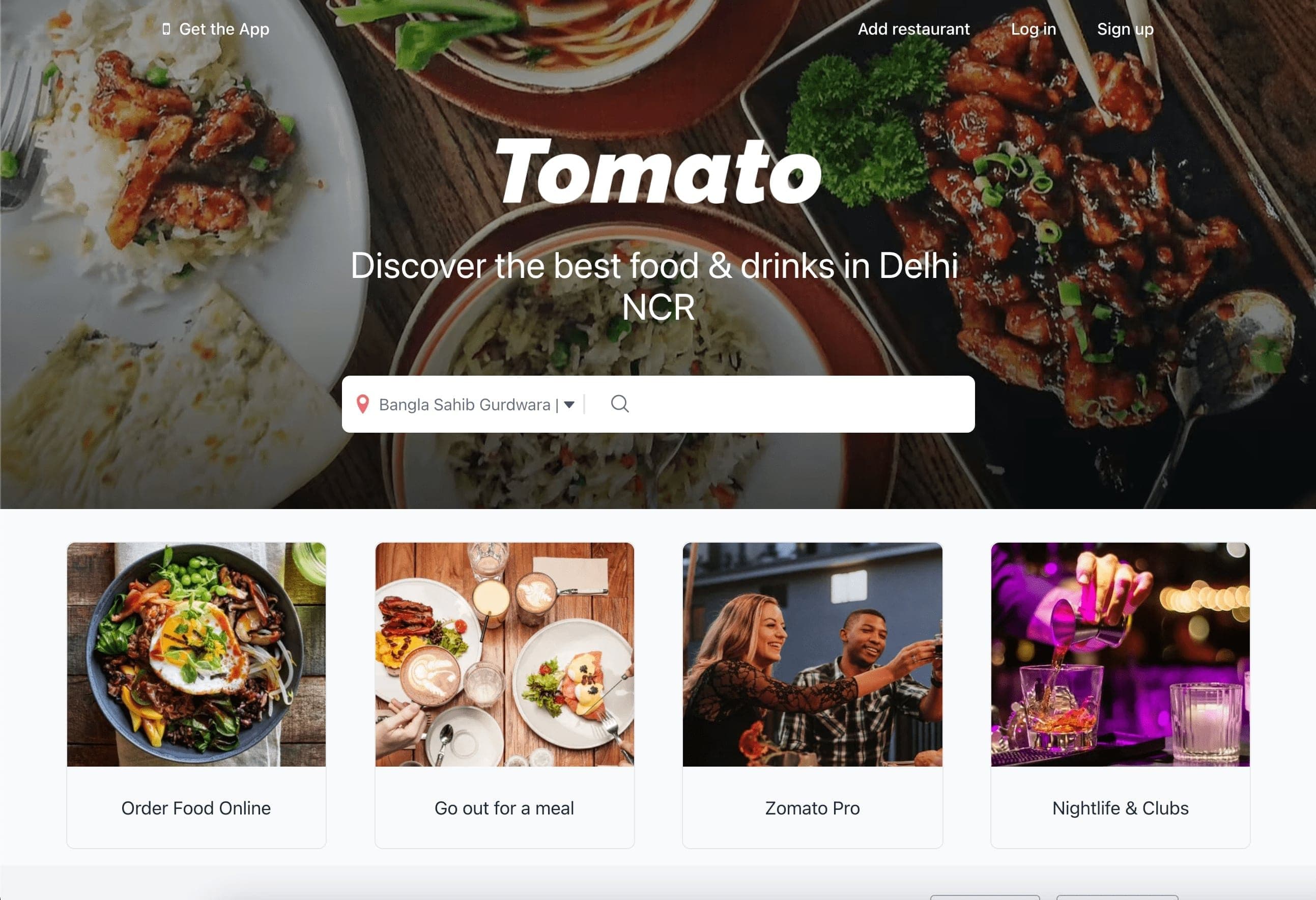
This experiment is part of the NativeBase Clone Experiment Series. The team drew inspiration from well-known food ordering applications to create their own demonstration using NativeBase React and React Native. The primary objective involved writing the demo once with the expectation it would function across multiple platforms leveraging React Native behavior.
Sneak peek
The final result appears below, with a live demo available:

Source code
Implementation details are accessible via this Github project.
Project setup
A new project was initialized using Next.js CLI with the NativeBase template through this command:
yarn create next-app -e https://github.com/GeekyAnts/nativebase-templates/tree/master/nextjs-with-native-base-typescriptThe difficult parts
Below is the code for the banner component demonstrating how straightforward NativeBase development can be:

import React from "react";
import {
Center,
Image,
HStack,
Text,
Heading,
VStack,
Icon,
Divider,
Input,
Pressable,
} from "native-base";
import { AntDesign, Entypo, FontAwesome } from "@expo/vector-icons";
function Banner() {
return (
<VStack w="100%" h={500}>
<Image
position="absolute"
zIndex="-1"
source={{
uri: "https://b.zmtcdn.com/web_assets/81f3ff974d82520780078ba1cfbd453a1583259680.png",
}}
alt="Alternate Text"
w="100%"
h={500}
/>
<HStack
alignItems="center"
justifyContent="space-between"
mx={{ base: 10, md: 20, lg: 40 }}
py={4}
>
<Pressable flexDir="row" alignItems="center">
<Icon as={FontAwesome} name="mobile" size="xs" color="white" />
<Text color="white" fontWeight="medium" fontSize="md">
Get the App
</Text>
</Pressable>
<HStack space={{ base: "5", sm: "10" }} alignItems="center">
<Pressable>
<Text color="white" fontWeight="medium" fontSize="md">
Add restaurant
</Text>
</Pressable>
<Pressable>
<Text color="white" fontWeight="medium" fontSize="md">
Log in
</Text>
</Pressable>
<Pressable>
<Text color="white" fontWeight="medium" fontSize="md">
Sign up
</Text>
</Pressable>
</HStack>
</HStack>
<Center mt={20} w="100%">
<Image
width={80}
height={16}
src={"/images/tomatoWhite.png"}
alt="Alternate Text"
/>
<Heading
textAlign="center"
w={{ base: "90%", md: "60%", lg: "48%" }}
color="white"
fontSize={{ base: "3xl", md: "3xl", lg: "3xl", xl: "4xl" }}
fontWeight="normal"
lineHeight="xs"
mt={10}
mx={{ base: 10 }}
>
Discover the best food & drinks in Delhi NCR
</Heading>
<HStack
bg="white"
space="3"
alignItems="center"
w={{ base: "90%", md: "60%", lg: "48%" }}
py={2}
mt={12}
borderRadius="lg"
>
<Pressable flexDir="row" alignItems="center">
<Icon
ml="2"
as={Entypo}
name="location-pin"
size="6"
color="red.400"
/>
<Text color="coolGray.500" fontSize="md" mx="1">
Bangla Sahib Gurdwara |
</Text>
<Icon
as={AntDesign}
name="caretdown"
size="3"
color="coolGray.600"
/>
<Divider h={5} w={0.5} ml={2} orientation="vertical" />
</Pressable>
<HStack space="3" alignItems="center" flex={1}>
<Icon
ml={3}
as={AntDesign}
name="search1"
size="5"
color="coolGray.500"
/>
<Input
_hover={{ bg: "white" }}
_focus={{ bg: "white" }}
color="coolGray.500"
fontSize="md"
flex={1}
borderWidth={0}
outline="undefined"
/>
</HStack>
</HStack>
</Center>
</VStack>
);
}
export default Banner;Most NativeBase components are self-explanatory in their design and implementation.
Conclusion
Working with NativeBase to construct this application proved enjoyable and efficient. The framework significantly reduces the lines of code required for development. The team discovered that NativeBase provides direct access to a comprehensive component library capable of extensive customization for sophisticated designs. Built-in Next.js support enables developers to leverage its advanced features seamlessly.

